

ChatGPT vs Copilot : Best AI Assistant for Productivity

From supply chain to marketing strategies, AI is everywhere. With the increasing use of AI in, it is a top debatable question: Who wins- ChatGPT vs Copilot?
Since the inception of ChatGPT, from professional to personal use, it has become an everyday AI companion, and Microsoft’s Copilot is considered one of the toughest competitors to OpenAI’s LLM ChatGPT.
The industry experts take it on broader terms as Ginni Rometty, former IBM CEO, said once – “AI won’t replace humans, but those who use AI will replace those who don’t.”
Thus, before reading about more facts, it is crucial to know the basics about these gems of generative AI.
ChatGPT feels like a flexible companion. You can ask it anything, and it gives you ideas, drafts, summaries, or even full plans. Copilot, on the other hand, stays close to Microsoft tools. If your team lives in Outlook, Teams, Word, or Excel, Copilot becomes a quiet support system.
Looking closely at the stats, ChatGPT has 810 million MAUs (monthly active users), and users send 2.5 billion prompts each day. On the other hand, Copilot has 212 million MAUs as of Nov 25 and is projected to reach a $126 billion market size by 2035.
The AI assistant market is witnessing dynamic growth as these tools simplify tasks from providing quick answers to creating a weekly work plan. Still, some pain points need to be addressed, such as ChatGPT users’ worry about the accuracy of responses, and Copilot users reported that it works well only within the Microsoft ecosystem.
While using these tools personally provides quick answers, in cases of complex tasks or uncertainty with the prompts, they produce abrupt output that sometimes annoys users. Still, users are increasing.
Therefore, which one is the best: Microsoft Copilot vs ChatGPT? This article will help you explore more to find the perfect answer.
Let’s continue with the blog!
Read Also: Chatgpt Courses
ChatGPT vs Copilot: Quick Comparison Summary
ChatGPT and Copilot are the most widely used Gen AI assistants for coding, real-world development, and productivity. Still, business or tech leaders search: Is Copilot better than ChatGPT? For a complete understanding, here is a quick comparison. Later, it’ll help you to go with the flow in a deeper sense.
| Feature / Factor | Microsoft Copilot | ChatGPT |
|---|---|---|
| Primary Purpose | An AI-powered assistant that helps work faster inside or across the Microsoft ecosystem | Conversational AI for coding, writing, research, content creation, and data analysis. |
| Best For | Businesses using Microsoft products want to improve productivity | Individuals and business leaders who need a flexible AI assistant for various tasks. |
| Models | OpenAI’s latest models, Claude Sonnet 4, Claude Opus 4.1 | GPT 5.1 & Pro, GPT 4o,4.1, 4.5 and others |
| Core Strengths | Deep integration with Microsoft 365 apps, enterprise-grade security, and coding assistance | Complex problem solving, brainstorming, platform agnostic, multimodal capabilities, and more. |
| Coding Ability | Yes, best for Microsoft-based workflows and code reviews | Better for learning and understanding code, provides examples and clear explanations. |
| Content Creation | Only helps with basic content creation | High in creativity and versatility, the best option for content creation. |
| Integration Level | Integrates seamlessly inside the Microsoft platform | Works fine with a variety of platforms and has no dependency on one system. |
| Real-Time Data | Access data through live documents and Microsoft data | Depends on plan and plugins |
| Ease of Use | Yes | Yes |
| Limitations | Limited to Microsoft products | Depends on prompts and occasionally produces inconsistent output |
| Pricing | Free with selected Microsoft 365 plans or add-ons, Copilot Pro at $20/month. | Free to use for all; for premium features, paid plans are a must ($20/month onwards). |
Copilot: Key Features, Strengths, Market Stats, and Limitations
Instead of calling it an AI assistant, it would be better to call Microsoft Copilot a suite of AI tools integrated into the Microsoft 365 apps, including Windows and GitHub. It helps with context, boosts productivity, and makes workflows easier as an AI assistant. Additionally, Copilot also assists with complex tasks like data analysis by letting you get data from spreadsheets, papers, slides, and other sources.
In simple words, Copilot assists users in writing, analyzing, designing, coding, and automating tasks by combining generative AI with the Microsoft ecosystem.
Copilot’s Key Features
- Integration with Microsoft 365: Copilot works smoothly inside Microsoft’s products, such as Word, Excel, PowerPoint, Outlook, and Teams. Users can easily draft content, summarize a document, create a presentation, and analyze data, and Copilot answers with contextual awareness.
- Project Management: It’s easy to manage projects using Copilot in Microsoft Teams. Professionals can monitor tasks and schedules to keep the project on course.
- Communication: Microsoft 365 Copilot records meetings, makes notes, creates actions, summarizes key actions from the inbox, drafts emails, adjusts the tone, and more. Overall, it helps business leaders communicate more smoothly with their teams and clients.
- Documentation: With MS Copilot, you need to write a single, simple prompt, and it will create the first draft, i.e., reports, presentations, and emails. Later, you can ask for editing suggestions aligned to your business documentation needs and create a final draft in less time.
- Workday Assistance: Looking to organize your day based on real information? Microsoft Copilot is your AI tool. It fetches the information and understands schedules, calendars, tasks, and email activity. You can easily ask for open follow-ups, suggestions for today’s meeting, and more.
- Image Creation: It utilized the DALL·E 3 model that allows users to generate images using single prompts. Users can easily customize and refine the images using prompts and produce a final output.
- Enterprise-grade Security: Microsoft Copilot operates within Microsoft’s security protocols, offers data protection, compliance certifications, and granular access controls. Apart from this, you can control what it remembers, update, and forget info. Copilot’s memory management settings are in your hands.
Key Market Stats
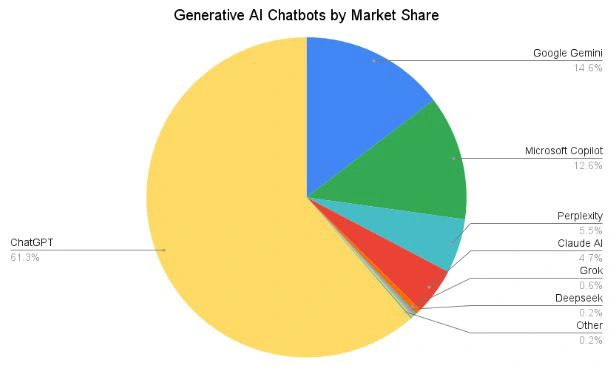
Image Credit: firstpagesage.com
- Microsoft Copilot has 12.6% AI search market share and is recognized as the second most popular generative AI chatbot in the market.
- Copilot has been downloaded 36 million times since launch, and compared to the previous year ( 30 million) in 2025, it has 33 million active users.
- 70% of Fortune 500 companies are using Microsoft Copilot for automation and improving productivity.
- Based on the Forrester Study, the businesses have witnessed a 2.5% increase in sales wins, a 25% acceleration in employee Onboarding, and achieved 116% ROI.
- Approximately 70% of employees involved in commercial sales, support, and partner services now use Microsoft 365 Copilot every day.
Strength
- Works naturally inside Microsoft 365 tools.
- Produce accurate results using contextual understanding capabilities.
- Saves time, reduces cost, and effort for manual and repetitive tasks.
- You can easily adopt Microsoft Copilot without a change in workflows.
- Easily scales with the growing demands of enterprises.
Limitations
- Ecosystem lock-in only works effectively within the Microsoft ecosystem.
- For high-stakes tasks, Copilot’s output requires human review.
- Enterprise edition is costly, which creates issues for small businesses.
- Copilot easily accesses the data; thus, in a case of loose data governance, privacy is at risk.
- Although available for all, producing accurate output requires user training.
ChatGPT: Key Features, Strengths, Market Stats, and Limitations
ChatGPT is known for its ability to understand questions, create ideas, and produce human-like content in seconds. Instead of working inside one ecosystem, it acts like an open AI companion that supports writing, planning, coding, research, and creative work across many platforms. Today, individuals, teams, and even large enterprises use it for tasks that need clarity, speed, and fresh ideas.
In simple words, ChatGPT helps users write, think, analyze, and solve problems using natural language. You can ask for an explanation, create a draft, make a plan for the week, and more. It responds with clear, structured output.
ChatGPT’s Key Features
- Natural Conversation: You do not need technical skills to communicate with ChatGPT. Using simple language, you can ask questions and get replies in simple and plain English. It utilizes NLP capabilities for answering the question.
- Deep Research: ChatGPT is designed for multi-step research tasks as it reads and synthesizes content through multiple platforms, online sources, produces search results, and provides well-structured outputs.
- Data Analysis: Whether you want to summarize the trends, clean data, or make projections, ChatGPT helps in data analysis. You or your teams can use it for analyzing data from spreadsheets, CSVs, and other structured formats.
- Multi-Modal Capability: Using newer model versions such as GPT 5.1, this Gen AI assistant easily understands and analyzes images, documents, and voice inputs.
- Advanced Reasoning: One of the best features of ChatGPT is advanced reasoning. Users can brainstorm and analyze their ideas, explain concepts, and compare anything from text to code. It helps in making faster decisions.
- Coding Assistance: ChatGPT vs Copilot in terms of coding, ChatGPT is much promising. It’s tremendous at generating code, debugging, writing code scripts, functions, and more. As a result, your development team can write code faster.
- Custom GPTs: You can create task-specific GPTs by providing specific instructions, creating a knowledge base, and refining your prompts. Also, you can pull pre-made GPTs for your tasks from the GPT store.
Market Stats
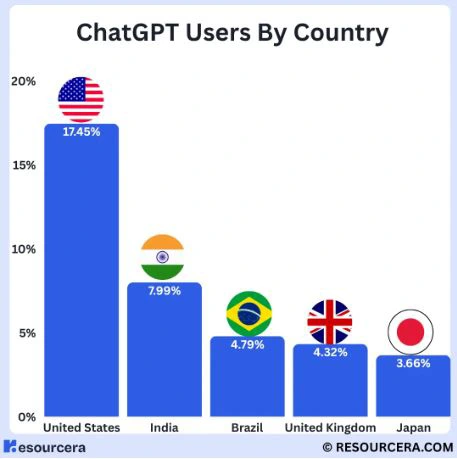
Image Credit: resourcera.com
- ChatGPT has 800 million active users as of 2025, and in October, ChatGPT’s website recorded 775.6 million visits.
- Based on the official site’s data, 30% of usage is work-related, and 70% is personal, but both categories continue to grow.
- ChatGPT has an 81.85% AI chatbot market share worldwide.
- 92% Fortune 500 companies have adopted ChatGPT, where 58.5% are using it for writing code and 80.5% are using it for learning new topics.
- The United States is a leading adopter of ChatGPT for professional and personal use, with a 17.45% share.
Strength
- Comparing ChatGPT vs Copilot, ChatGPT is platform agnostic and provides users with ecosystem flexibility.
- This OpenAI companion can handle versatile tasks such as text generation, creative content, images, and coding.
- Easy to use for all, such as business leaders, sales & marketing teams, developers, and also for personal use.
- Offers advanced reasoning, data analysis, and coding abilities.
- Users can rely on OpenAI’s ChatGPT for understanding and learning new concepts.
Limitations
- Sometimes accuracy is a concern, as it needs clear prompts, and for complex tasks, it requires human review.
- Although available free for all, premium features require a paid plan.
- Data security and privacy are also big concerns for a public-facing chat interface, except for the enterprise plan.
- It can reflect the bias trained on a variety of data sets. Output verification requires expert reviews.
- There are some contextual limits associated with ChatGPT, as it can forget the details while processing long conversations.
Read Also: Prompt Engineering Courses
Coding Performance Comparison: ChatGPT vs Copilot
In the quest to know about ChatGPT vs Copilot, this section talks about the coding performance comparison. Initially, both tools, OpenAI’s ChatGPT and Microsoft’s Copilot, are great at coding; still, there are some differences.
ChatGPT is more suitable as a reasoning engine that produces and explains code based on logic; on the other hand, Copilot works directly inside the IDE(through GitHub Copilot) and for various frameworks like VS Code. ChatGPT does not support native IDE integration.
Microsoft Copilot for coding helps developers with faster routine coding, reads code, and provides suggestions in real-time. Basically, Copilot learns from the context and suggests or autocompletes the code. On the other hand, ChatGPT assists coders to learn new coding concepts faster and provides flexibility as it is not associated with a single IDE and supports a wide range of frameworks.
Thus, who performs better in coding – ChatGPT vs Copilot?
ChatGPT gives broader support, deeper explanations, and better help for learning, debugging, or logic breakdowns.
GitHub Copilot (Microsoft Copilot) is stronger when you need fast, in-editor suggestions and auto-completions that match your existing code style.
In simple words, ChatGPT is better for understanding and reasoning, while Copilot is better for writing code fast inside your development tools.
Content Creation & Writing: Which Tool Performs Better?
ChatGPT and Microsoft Copilot are good at creating content and help users while crafting marketing copy, blog posts, social media content, academic essays, and creative writing. But they are different in terms of style and output generation.
In terms of writing, Copilot has limitations as it supports the insider Microsoft ecosystem, such as MS Word, Outlook, and PowerPoint. Compared to it, ChatGPT is more flexible and helps effectively with brainstorming, ideas, drafts, revisions, and explanations.
Comparing Microsoft Copilot vs ChatGPT, Copilot is specially designed for business-style communication, but ChatGPT supports all types of communication from casual to professional.
Copilot is limited to the summaries and short drafts, but using ChatGPT, you can easily work on long-form content, even mimicking a brand’s voice in your text and using specific prompts that produce consistent writing.
Therefore-
Best for:
- Copilot – business users, executives, and enterprises
- ChatGPT- creative teams, content strategists, social media marketing teams, and common users.
Use Microsoft Copilot if:
- You use Microsoft 365 and need a fast response within this ecosystem while working.
Or ChatGPT is the best when you need:
- Creative flexibility, to work on long-form content, and customization.
Integration and Ecosystem: ChatGPT vs Copilot Tools
From the integration perspective, we’ve already gone through the details, such as ChatGPT is open and flexible to platforms, but Copilot is deeply integrated with Microsoft 365 and works with Microsoft tools.
Let’s understand the difference between Microsoft Copilot Vs ChatGPT in detail.
| Area | ChatGPT | Copilot |
|---|---|---|
| Primary Environment | Open and supports cross-platform | Microsoft ecosystem and apps like Office, PowerPoint, etc. |
| Operating System | Flexible and runs in browsers and mobile apps | Native in Windows 11 |
| Customization | Supports through custom GPTs and APIs | Only through Copilot Studio & Microsoft tools |
| Third-party Integration | Supports a myriad of platforms | Limited only to Microsoft partners |
| Security & Compliance | Only with the enterprise version | Provides high enterprise-grade security and supports governance policies |
| Development | Through OpenAI API and SDKs | Integrated with IDEs ex. VS Code, JetBrains. |
Therefore, if your question is – Is Copilot better than ChatGPT in terms of integration? Yes, if you have invested in the Microsoft 365 ecosystem and want to use an AI assistant for business purposes.
Or
Use ChatGPT when you need flexibility at its core and want to build a custom solution aligned to your company’s or enterprise’s needs.
Pro Tip:
You can maximize your organization’s productivity using Copilot(internal office tasks) and ChatGPT(creative tasks) in hybrid mode.
Security, Privacy & Data Handling Differences
For business leaders, CEOs, and CTOs, security is at the forefront. Thus, while looking to use an AI assistant and decide which one is better, ChatGPT vs Copilot, it is a must to identify the security, privacy, and data handling differences.
Closely looking at the facts, Microsoft Copilot is a clear winner in terms of security as it provides enterprise-grade security. How? Using Microsoft Entra ID for authentication and allowing only the permissions for which users are allowed. Additionally, it also offers zero leakage data.
Simply, Copilot doesn’t allow cross-organization interaction or model training on customer data. The data stays within the Microsoft Cloud. Apart from it, it also supports compliance for a multitude of industries such as government, healthcare, finance, and more.
Comparing Microsoft Copilot vs ChatGPT, ChatGPT is flexible, but there is a difference between its free plan and enterprise plan. The free plan doesn’t ensure more security, but yes, the enterprise plan offers security where inputs are not stored for the model training. ChatGPT is more inclined for common users, so the best choice depends on your needs.
Copilot vs ChatGPT: Use Cases and Real-World Applications
Copilot and ChatGPT are two of the best free Generative AI tools and assist users in writing, image creation, search, finding information, and more. However, there are some slight differences.
Let’s look into the details.
Microsoft Copilot Use Cases
- Documentation: Integrated into Word, Copilot helps with report drafting, creating proposals, presentations, and summarizing reports. Directly, it automates workplace productivity.
- Email & Communication: Saves the time of business leaders in summarizing long emails, tracking open follow-ups, drafting email replies, and calendar management.
- Efficiency & Collaboration: Generates MOM, recap discussions, summarize key decisions, and more while using Teams. Also helps leaders to stay updated about the projects.
- Data Analysis: Copilot makes data analysis easier by getting information from Excel files, SharePoint, and other technologies. Uses natural language commands to make charts and graphs.
- Project Management: Leaders can use Copilot for tracking project deadlines in real-time, identifying risks based on data analysis, and scheduling tasks for better outcomes.
- Business Chat: Microsoft Copilot helps support teams for answering business-specific questions, pulling information from authentic documents and official knowledge bases with access control.
ChatGPT Use Cases
- Content Creation: ChatGPT helps marketing teams write SEO-ready content, marketing copy, email campaigns, and social media content that will show up in search engine results pages (SERPs).
- Customer Support Automation: Enable chatbots to handle the routine customer communication and provide prompt support to the customers.
- Market Research and Analysis: Helps sales teams and managers to analyze sales data, identify trends, create sales action plans, promotional strategies, and more.
- Process Automation: The Enterprise plan allows for API integration that helps in connecting AI assistants to CRMs, ERPs, HR systems, and analytics tools. Also automates the form filling and document processing.
- Internal Knowledge Management: Helps in creating an internal knowledge base and saves the time of employees for searching for any information from the internal docs.
- Coding and Development: Developers can easily create code snippets, understand and debug complex code, generate test cases, and learn new concepts in less time, which speeds up the development work.
Pricing Comparison: Copilot Plans vs ChatGPT Plans
While comparing ChatGPT vs Copilot, it is essential to understand the pricing difference. So, based on your use cases, you can also make a decision according to your budget. Here, the prices work like-
| Version | Copilot Price | ChatGPT |
|---|---|---|
| Free | No-cost | No-cost |
| Individual |
|
|
| Business |
user/month, paid yearly
|
$25 /user/month billed annually |
| Enterprise | $30.00 user/month, paid yearly | Custom pricing |
Conclusion
Throughout the blog, you have walked through all crucial details related to ChatGPT vs Copilot in terms of key features, coding performance, content creation, integration, use cases, and other details. Hope you’ve got your answer, which will be your next AI companion.
Despite deciding between ChatGPT and Copilot, what matters more is your purpose in using any of these tremendous Gen AI tools for improving productivity. The real fact is that both tools are mature with time, and users like business leaders, CEOs, coders, sales professionals, or common users are using these tools accordingly.
Considering all facts, choose Copilot if you rely on Microsoft 365 and need a secure, integrated AI solution for productivity. Or if you need an AI assistant that is flexible and platform agnostic, provides advanced reasoning features, and you want to use it for broader use cases, ChatGPT is your tool.
FAQs
Which is better for content writing: ChatGPT or Copilot?
If you want to create short-form content for business communication, then Copilot is the best. But if you want to create long-form content that must carry creative elements, none other than ChatGPT is the best.
Which is better for coding: ChatGPT or Copilot?
Copilot ( as a part of the Copilot suite, GitHub Copilot) is better for coding as it autocompletes the code, suggests corrections, and effectively understands the project structure. It works seamlessly inside the IDE. On the other hand, ChatGPT is best for debugging, code explanations, and learning new programming languages and frameworks.
Can ChatGPT replace Microsoft Copilot?
Hypothetically or in reality, one tool can’t replace another, whether it’s ChatGPT vs Copilot or ChatGPT vs Gemini or others. But yes, the choice of users depends on their needs and use cases.
Which AI tool is better for students: ChatGPT or Copilot?
From the students’ POV, ChatGPT is the best as it works on broader terms and provides simple to complex answers about any topic instantly, and helps in learning concepts. Its free version offers sufficient features for students to utilize. Copilot is task-focused, which may not suit some students’ needs.
Get in Touch with
AI Experts
Kapil Kumar is a leading voice in the field of Artificial Intelligence, blending deep technical expertise with a passion for innovation and real-world impact. As an accomplished author, researcher, and AI practitioner, he brings clarity to complex technologies—making AI not only understandable, but actionable. Whether decoding algorithms or envisioning ethical frameworks for AI, he is committed to guiding professionals, students, and tech enthusiasts through the rapidly evolving world of artificial intelligence.